The data is from https://forum.xda-developers.com/general/help/idea-to-root-sonys-e-reader-dpt-rp1-t3654725/page8
Thanks the author - shankerzhiwu
About the OTG cable, I have no shortcut available. Pinout of micro usb plugs can be found on https://en.wikipedia.org/wiki/USB_(Physical)#Pinouts . The 7.87 k resistor should be soldered between ID(PIN 4) and GND(PIN 5). Alternately, you can also use a 7.5k resistor. Since such resistor value is beyond OTG standard, you have to do the solder work. For simplicity, a breakout board can be used like http://www.digikey.com/product-detai...192-ND/5673778 . Moreover, you can also choose to only solder the resistor itself without a USB cable. If so, after the gray rect is shown on the screen, the OTG plug can be safely disconnected and a normal USB to micro USB cable can be used to connect the DPT to your computer.
The detailed steps for entering diagnose mode are :
1. Power off your DPT.
2. Connect the OTG cable.
2. Press and hold the Home button.
3. With the Home button pressed, press and release the Power button.
4. Continue holding the Home button. See if anything is shown on the screen.
4.a. If "Welcome" screen shows, which means that the Home button is not detected pressed when booting, go back to step 1.
4.b. If nothing is shown on the screen and the power LED is also not flashing, which means that you are too nervous to trigger the power button -- your DPT is not powered on at all, go back to step 3.
4.c. if nothing is shown on the screen and the power LED keeps flashing, then the Home button can be released.
5. Wait for about 12 seconds. See if anything is shown on the screen.
5.a. If the screen flashes blank and the power LED stops flashing and turns off, which means that the id resistor is not soldered well (ill-connected or wrong value)., check your OTG cable and go back to step 2.
5.b. if a gray rect is shown on the screen, the device is now in diagnose mode
6. If a USB cable is not soldered with the micro USB plug, you can now unplug it and use a normal micro USB cable to connect the DPT with your computer.
7. A USB modem device should now be detected on the computer. Use a serial terminal software to access the diagnose tty.
2020年5月22日 星期五

Convert MBR to GPT
I am not sure why my new clone disk is MBR, not GPT. I want to change it.
After searching internet, I found we can use "MBR2GT.exe" to do this.
The steps below is how to do it.
1. Open PowerShell Window.
2. Type "Get-Disk" command to check your disk number.
3. Open Dos Window with administrator privilege.
4. Type "MBR2GPT.EXE /convert /disk:2 /logs:D:\ /allowFullOS" to convert disk.
You could also refer to the link below to get detail information.
https://docs.microsoft.com/en-us/windows/deployment/mbr-to-gpt#summary
After searching internet, I found we can use "MBR2GT.exe" to do this.
The steps below is how to do it.
1. Open PowerShell Window.
2. Type "Get-Disk" command to check your disk number.
3. Open Dos Window with administrator privilege.
4. Type "MBR2GPT.EXE /convert /disk:2 /logs:D:\ /allowFullOS" to convert disk.
You could also refer to the link below to get detail information.
https://docs.microsoft.com/en-us/windows/deployment/mbr-to-gpt#summary
2020年5月21日 星期四
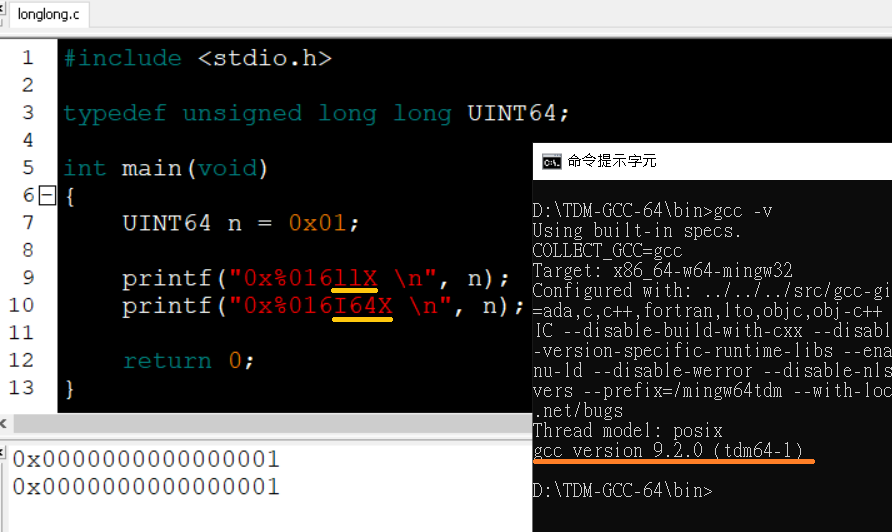
long long variable in C.
以前查資料發現,Windows 上的 gcc 底層還是呼叫 OS Runtime,故使用 "%ll" 會有問題。

最近無意間發現,這個限制已經是以前的事了,至少下列 2 種環境,測試起來都正常。
TDM-GCC-64 : 9.2.0
Visual Studio 2015
Google 雖然強大,但有時找到的都是過時資訊,畢竟時空背景都已經和當初不同。
故易經曰:若履虎尾,終之吉。
The Delay in UEFI Shell Entry
I did a lot of tests in past two weeks. Due to our tool issue, we must reboot system after testing one bit. The system took 24 seconds to reboot, but our one bit test just took 55 ~ 56 seconds. This is a heavy wasting for completing a test. I cannot do any improvements for this issue because I am not the owner of this function. However, I can do another way to decrease the boot time.
In original UEFI Shell, it waits 5 seconds to prevent from user wants to stop launching the "startup.nsh". If we can decrease this time, it can also reduce our test time.
The UEFI Shell Entry is in "Root\ShellPkg\Application\Shell\Shell.c". We can search the key word "UefiMain" and we can find the setting is in this "ProcessCommandLine" function. The setting is stored in the "ShellInfoObject.ShellInitSettings.Delay" variable.
After modifying this variable, we can just wait 1 second, this can decrease 4 seconds in our one bit test time. It is not bad. Just for fun.
2020/05/21 Update
I am a stupid man. We can use "argv" to set up this delay time. This information is described in "3.2 Invocation" of "UEFI_Shell Specification". We can pass "-delay n" to UEFI Shell.
I thought one question when I ate lunch. How do I pass "-delay n" in boot time? I think this is a good question. I don't know right now !
In original UEFI Shell, it waits 5 seconds to prevent from user wants to stop launching the "startup.nsh". If we can decrease this time, it can also reduce our test time.
The UEFI Shell Entry is in "Root\ShellPkg\Application\Shell\Shell.c". We can search the key word "UefiMain" and we can find the setting is in this "ProcessCommandLine" function. The setting is stored in the "ShellInfoObject.ShellInitSettings.Delay" variable.
After modifying this variable, we can just wait 1 second, this can decrease 4 seconds in our one bit test time. It is not bad. Just for fun.
2020/05/21 Update
I am a stupid man. We can use "argv" to set up this delay time. This information is described in "3.2 Invocation" of "UEFI_Shell Specification". We can pass "-delay n" to UEFI Shell.
I thought one question when I ate lunch. How do I pass "-delay n" in boot time? I think this is a good question. I don't know right now !
2020年5月20日 星期三
蘇慧倫《面面》

高中時幾乎都在鬼混,故沒有甚麼印象有同學討論她,也可能是因為同學都是女生居多,自古文人相輕,女人特別喜歡為難女人,故不容易聽到女同學討論吧!我猜?
到了大學以後,我中南部的女同學就很喜歡她,可能也跟那時候一連出了好幾張膾炙人口的專輯有關,每次呼朋引伴去 KTV 唱歌,《鴨子》、《傻瓜》那些歌都是必點歌曲。
最近 YouTube 突然又自動跳出了好幾首蘇慧倫《面面》專輯的歌曲,每首歌的曲風都是我喜歡的,算一算至少有七首我都喜歡,高達 70% 的比例不支持一下怎麼可以,於是我的收藏又多了一樣寶貝。
看書開心,聽好聽的音樂也開心,但是 mooInk Pro 破解之路不順就讓人不開心 ...
DDR4 Memory module interface type 之俄羅斯記憶法
測試資料中,常常需要區分 DRAM DIMM 種類,可惜不是每筆資料在測試時都有寫上適當描述,故需先查模組型號,接著再 Google SPD 資料,最後才是翻找 Spec,由於不是做這個的,理所當然看完後也很快忘記,昨天洗澡時想到一個不錯的俄羅斯記憶法。
Memory module interface type 是定義在 SPD 規格書的 Byte3:
01 - RDIMM
02 - UDIMM
03 - SO-DIMM
04 - LRDIMM
反正目前還沒有 LRDIMM 測試資料,故先不管它,剩下的 3 種 DIMM 的每一個英文字母開頭剛好就是俄羅斯的英文 Russia,這樣就不會忘記了。
Memory module interface type 是定義在 SPD 規格書的 Byte3:
01 - RDIMM
02 - UDIMM
03 - SO-DIMM
04 - LRDIMM
反正目前還沒有 LRDIMM 測試資料,故先不管它,剩下的 3 種 DIMM 的每一個英文字母開頭剛好就是俄羅斯的英文 Russia,這樣就不會忘記了。
2020年5月19日 星期二
網路時代之電子費用帳單
這裡的電子費用帳單,指的不是傳統帳單電子化,而是新興的網路服務所帶來的費用。
以我個人為例,我目前一年要繳的帳單就有下列幾種:
1. Amazon Domain - US 0.6 / month + US 12 / year,如果有查詢流量另計。
2. Google Drive - NT 900 / year
3. 愛奇藝 - 趁著大特價入手,大概都是 NT 1,000 / year
4. Youtube - NT 179 / month
5. Whocall - NT 300 / year
曾經用過,但不是常態:
1. PureVPN - US 10.95 / month,這家要注意,購買時沒有提到會自動續訂,解約時要用線上客服取消,並且一整個囉嗦。
2. KKBOX + KKTV - NT 168 / month
3. KKBOX - NT 180 / month,直接從 Google 商店購買,我猜未含 KKTV?
只算固定有持續使用的,一個月費用就要差不多 NT 410,積少成多也甚是可觀。
以我個人為例,我目前一年要繳的帳單就有下列幾種:
1. Amazon Domain - US 0.6 / month + US 12 / year,如果有查詢流量另計。
2. Google Drive - NT 900 / year
3. 愛奇藝 - 趁著大特價入手,大概都是 NT 1,000 / year
4. Youtube - NT 179 / month
5. Whocall - NT 300 / year
曾經用過,但不是常態:
1. PureVPN - US 10.95 / month,這家要注意,購買時沒有提到會自動續訂,解約時要用線上客服取消,並且一整個囉嗦。
2. KKBOX + KKTV - NT 168 / month
3. KKBOX - NT 180 / month,直接從 Google 商店購買,我猜未含 KKTV?
只算固定有持續使用的,一個月費用就要差不多 NT 410,積少成多也甚是可觀。
訂閱:
文章 (Atom)